BOFC is a native Salesforce application which helps devs or admins to perform Bulk CRUD Operations, and also helps to manage Salesforce configurations. This application has two versions:
- Free version
- Paid version
Free Version can be installed directly from AppExchange page of BOFC using link. Free version has all the features or capabilities which are available in Paid version, but limited to some extent.
For example:
- In Free version, user can create upto 30 fields in bulk, but in Paid Version there are NO limits
- In Free version, user can delete upto 10 fields in bulk, but in Paid Version there are NO limits
Paid Version: Once user is happy and find the app useful, he can opt to upgrade from Free version to Paid version. User can purchase Paid version from the official webpage of BOFC: https://bofc.io
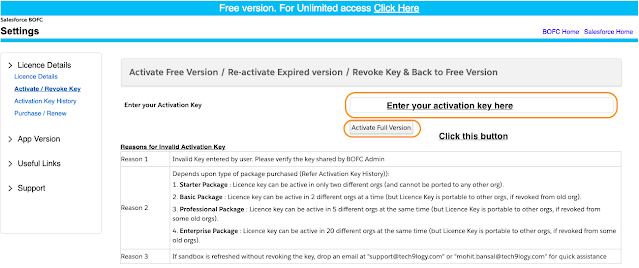
Once a full version license is purchased, user will receive an email with Activation KEY. Please follow below steps to activate full version.
Few Simple Steps to Activate Full Version of BOFC:
- If Classic – Login to Salesforce > Go to Applications drop-down > Click “Bulk Object Field Creator”
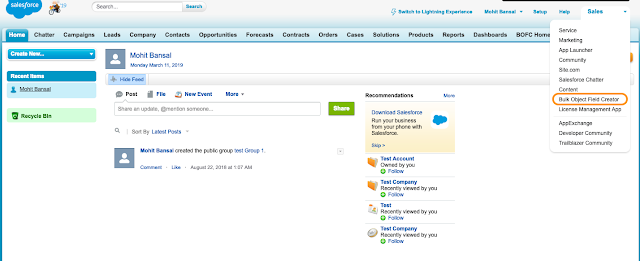
Classic View
- If Lightning – Login to Salesforce > Click on 9 dots > Click Bulk Object Field Creator
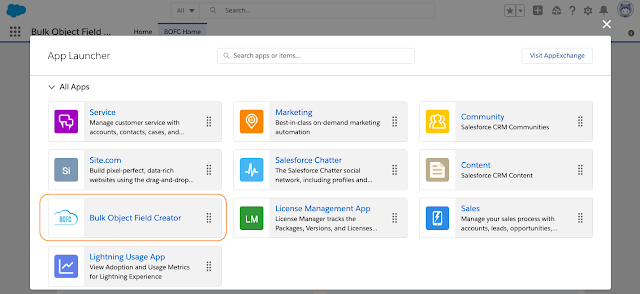
Lightning View
2. It will open BOFC Home page as shown below. Click “Settings” on the BOFC header
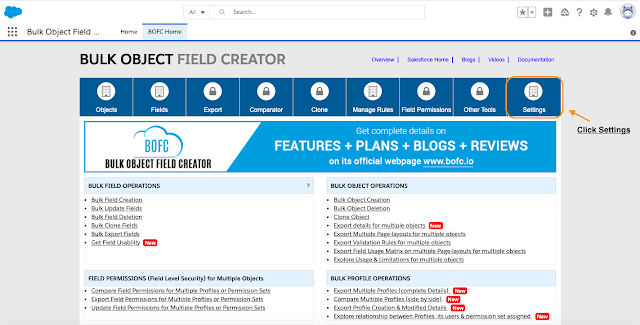
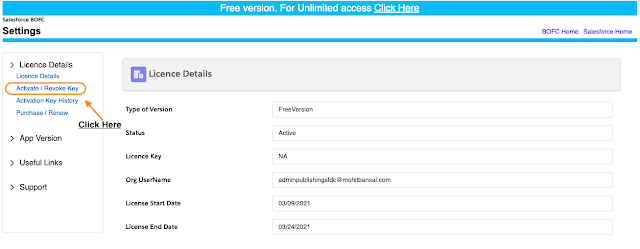
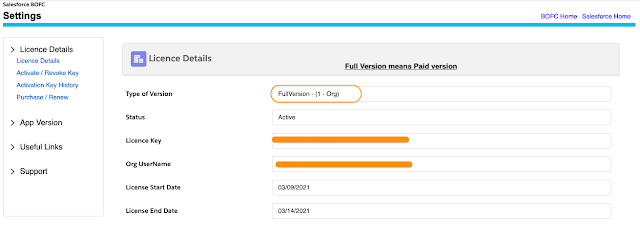
3. Click Settings and it will open below screen.
Have you started using BOFC yet? Thousands of BOFC users have been able to save time & boost productivity using our Salesforce Metadata app. Click here to install the latest version of BOFC application in your Salesforce instance & explore its complete benefits for you.
For any queries or suggestions, you can contact us at https://www.bofc.io/#contact or mail us: support@bofcapp.io. Our BOFC Expert will help you get the best out of it.